
EZ TAG
Harris County Toll Road AuthorityTravel & Local
4.2345.00 Reviews
- Version
- 3.3.1175451
- Installs
- 100.00K
- Age Rating
- Everyone
Screenshots
Our Review of EZ TAG
 Analysis by Appyee
When I drive on Harris County toll roads, I want account management to take as little attention as possible. That is the real reason to consider EZ TAG: it is a free Travel & Local app from the Harris County Toll Road Authority designed for people who already use an EZ TAG account and would rather handle routine account tasks from a phone than depend on a desktop browser or occasional paperwork.
My view is straightforward. This is not a general travel planner, navigation tool, or road-trip companion. Its value is much narrower and more practical: keeping your toll-account details within reach. If you regularly use Harris County toll roads, that focus can make it worthwhile. If you rarely drive there, use another toll system, or only need directions, the app is unlikely to earn a permanent place on your phone.
What I would consider before installing it
I’d treat this section as a quick fit check: the app is most worthwhile when an EZ TAG account is already part of your regular driving, not simply because you want another travel tool. I’d also think about which account tasks I usually postpone and whether handling them on a phone would genuinely change that habit. With that in mind, the next question is what keeps it useful after the first few checks.
The first question is whether your driving matches the service
I would begin with geography and routine rather than the app’s rating. The developer is the Harris County Toll Road Authority, so the app makes the most sense for an existing EZ TAG customer whose driving is connected to that authority’s toll-road service. That distinction matters because a toll-account app cannot replace a navigation app, a map, or a roadside-assistance service.
For the right driver, the benefit is convenience. Instead of waiting until I am back at a computer to think about my account, I can use a mobile interface while planning a trip, checking my account before leaving, or dealing with an administrative task when it is fresh in my mind. That is a small improvement, but toll accounts are exactly the sort of thing people remember only when they need them.
I would also ask how often I need account access. A daily commuter has more to gain than someone who passes through the area once every few months. Frequent use gives the app a chance to become part of a simple routine: check the account before a busy travel week, review activity after using toll roads, and make sure account details are still current when circumstances change.
What the app is, and what it is not
EZ TAG is an app rather than a new toll product. Installing it does not turn an ordinary phone into a toll tag, and it should not be treated as a replacement for the account itself. I see it as a mobile control point for people who already have a relationship with the EZ TAG service.
That makes expectations important. Someone searching for live traffic guidance, route planning, parking discovery, or public-transit directions should choose a dedicated travel app instead. Those tools are built around movement from one place to another. EZ TAG is built around the account behind toll-road use, so its usefulness appears before or after the drive rather than while I am actively navigating.
The app is free, which removes the most obvious barrier to trying it. It is also rated for Everyone, making it broadly accessible from an age-rating perspective. I would still treat account security and careful login habits as more important than the simple installation decision, because a toll account can contain information that deserves the same care as other financial or travel accounts.
How I would judge it in everyday use
I would judge the app on four practical points: whether it lets me reach the account information I need without unnecessary effort, whether the mobile layout is comfortable for quick checks, whether it reduces the need to remember a browser workflow, and whether it helps me avoid last-minute account surprises. Those are more meaningful tests here than visual effects or entertainment value.
A realistic example is a commuter preparing for a week with extra driving. Before leaving home, I could open the app and review the account instead of discovering a problem only after several toll-road trips. If I recently changed vehicles or account details, I would use the same moment to confirm that everything is arranged correctly. The useful insight is that the app works best as a pre-drive and post-drive checkpoint, not as something to operate while moving.
Another good use is handling an account question when I am away from my usual computer. A phone-based option is especially helpful for people who travel between work, home, and family commitments. The trade-off is that a smaller screen may be less comfortable for detailed review than a desktop site, so I would use the app for quick, focused tasks and a larger screen when I need to study a longer history or make a complicated change.
Where EZ TAG earns its place
For me, lasting value comes from making a small recurring task easier, rather than from novelty. A useful test is to keep it through a normal stretch of driving and notice whether I reach for it at sensible moments—before a busier period or after using toll roads—without letting account checks become distracting roadside chores. That routine is where its focused role can justify a spot on my phone.
A focused tool can be better than a crowded travel app
The strongest part of this app is its narrow purpose. A general travel application may offer maps, traffic layers, saved places, and transport information, but those features do not necessarily make toll-account management easier. With EZ TAG, I know what kind of task the app is intended to support. That focus is valuable when I do not want to search through unrelated travel features.
I also like the idea of separating driving guidance from account administration. Navigation apps are useful during a journey, but they are not the natural place to manage toll-account details. Keeping those jobs distinct can reduce confusion: one app helps me decide where to drive, while this one helps me deal with the toll service connected to that drive.
The app’s adoption suggests that it has reached a meaningful audience, with over one hundred thousand installs and an average rating of 4.2 from around one thousand two hundred ratings. I would not treat those figures as proof that every user will have the same experience, but they do indicate that this is an established mobile option rather than an obscure experiment.
It is most useful when timing matters
Account tasks are easy to postpone. That is where mobile access can make a difference. If I receive a reminder, remember a vehicle change, or realize that I should check my account before a longer drive, I am more likely to act when the relevant information is available in my hand.
A less obvious advantage is habit formation. I would place the app beside other practical travel tools and check it at predictable moments rather than opening it randomly. For example, a quick review before a monthly driving-heavy period can be more useful than waiting for a problem. The app does not need to be exciting to be valuable; it needs to reduce the friction between remembering a task and completing it.
That convenience is also helpful for households where more than one person shares responsibility for driving. The person who normally uses the toll roads may not be the person who manages every account detail. A mobile account tool gives the account holder a more direct way to stay involved, although I would avoid sharing login credentials casually and would make sure each person understands whose account is being accessed.
The version and device requirements are reasonable for many users
The current version is 3.3.1175451, and the app requires Android 8.0 or later. That makes compatibility a simple decision for most Android users: check the phone’s operating-system version before spending time troubleshooting installation. People using an older device may need to keep managing the account through another available channel rather than assuming every current app will run on it.
I would also keep the app updated through the normal app-store process when updates are offered. That is not because every update changes the experience dramatically, but because account-related applications benefit from staying on a supported version. If the interface changes, I would spend a minute learning where my most-used account actions moved instead of waiting until I need one urgently.
The friction I would watch for
The main limitation is the same thing that gives the app its focus: it is tied to one toll-account ecosystem. That is convenient for EZ TAG customers and irrelevant to drivers whose toll activity belongs elsewhere. I would not install it simply because I travel in Texas; the useful question is whether my toll account is actually connected to this service.
Mobile account management can also feel cramped when I need to inspect several details at once. A phone is excellent for a quick check, but a desktop browser may still be the better choice for careful comparison, record keeping, or a task that involves many fields. I see that as a trade-off rather than a failure, provided I choose the device according to the job.
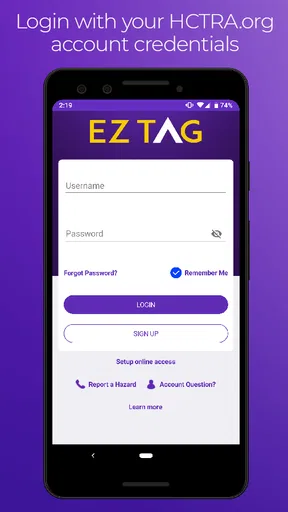
There is also a practical dependence on being able to sign in and reach the service when I need it. Before a major trip, I would avoid making the first login attempt in a parking lot or at the roadside. I would open the app at home, confirm that I can access the account, and resolve any account-recovery issue while I have time. That small preparation step is more valuable than discovering a problem when a toll-road decision is already urgent.
How it compares with the usual alternatives
The closest alternative is often not another app but a web browser. A browser may be better when I want a larger view, need to print or save information, or prefer not to install a dedicated application. EZ TAG becomes the better choice when repeated phone access matters and I want a more direct route to the account.
A general navigation app serves a different purpose. It can help me choose roads and understand traffic, but I would not expect it to replace a service-specific account tool. Using both can be sensible: navigation for the route, EZ TAG for account administration. Trying to make one do the other’s job is where frustration begins.
Drivers who use a different toll authority should look for that authority’s official account channel instead. A multi-service travel app may feel more convenient for people who move among several toll systems, but convenience depends on whether it actually supports the account I need to manage. In this case, a specialized official app is a strength for the matching user and a limitation for everyone else.
What switching from browser access really involves
Moving from a browser routine to a mobile routine is not a dramatic change, but I would still plan it rather than assume the app will instantly replace everything. I would install it, sign in when I am not rushed, confirm that the account view is familiar, and then keep the browser available until I know the app covers my normal checks comfortably.
The cost of switching is mainly attention and habit. I may need to learn a new layout, allow myself time to recover access if I have forgotten credentials, and decide which tasks are easier on a phone. Because the app is free, the financial risk of trying it is low. The more important question is whether the time saved during future account checks outweighs the small setup effort.
I would not uninstall the browser option immediately. A sensible workflow is to use the app for quick checks and ordinary account access, while keeping the larger-screen route for detailed administration. That approach avoids forcing every task into a phone-sized interface and gives me a fallback if the app is unavailable or less comfortable for a particular job.
Who should use it, and who should skip it
I would recommend EZ TAG to regular Harris County toll-road users who already manage an EZ TAG account and want a direct mobile option. It is also a good fit for people who tend to postpone account tasks until the last minute, because having the service on the phone can make those tasks easier to remember and complete.
I would be more cautious if I rarely use toll roads, have no EZ TAG account, or mainly need directions. In those cases, the app may add another icon without solving a real problem. Drivers with older Android phones should check the operating-system requirement first, and anyone who prefers a full desktop view for account administration may be happier staying with a browser.
The app is not something I would choose for entertainment, trip inspiration, or broad local discovery. Its Everyone content rating describes its general accessibility, not a promise that it is useful for every traveler. The right audience is defined by the toll-account relationship, not by a general interest in travel.
My recommendation after weighing the trade-offs
My recommendation is positive but specific: install EZ TAG if you actively use the Harris County Toll Road Authority’s service and want account access from an Android phone. The free price makes testing it easy, and the app’s focused role can remove a recurring bit of friction from toll-road administration.
I would approach it as a practical companion, not a complete travel solution. Use a navigation tool for routes, use the browser when a larger workspace is more comfortable, and use this app when the task is checking or managing the EZ TAG account from a phone. That division of labor is the clearest way to get value from it.
After trying it, I would keep it only if it changes my behavior in a useful way: fewer postponed account checks, less searching for the right web page, or more confidence before a busy driving period. For the right driver, that is enough to justify keeping a dedicated app. For everyone else, the usual browser or travel alternatives will probably be the better fit.
Overall, I see EZ TAG as a sensible, service-specific tool from the Harris County Toll Road Authority. Its strength is not breadth; it is the convenience of putting a relevant toll-account workflow within reach. With over one hundred thousand installs, a 4.2 average rating, and a free download, it is easy to try. I would recommend it to the audience it was built for, while being honest that drivers outside that audience should skip it rather than expect a general-purpose travel app.
Verdict
Strengths of EZ TAG
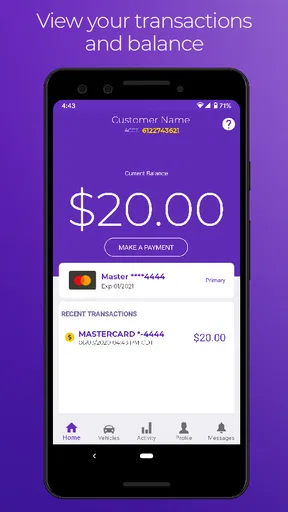
- Quickly check toll account balances and recent transactions.
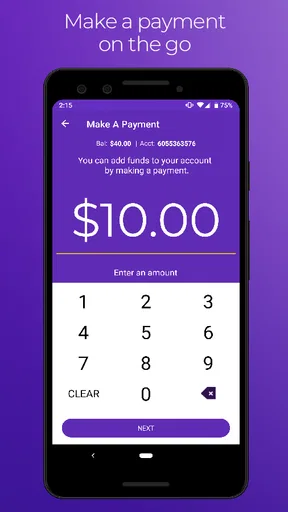
- Conveniently add funds without visiting a service center.
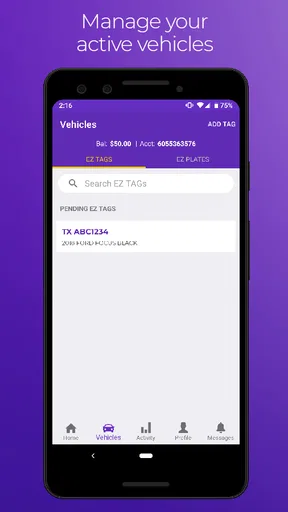
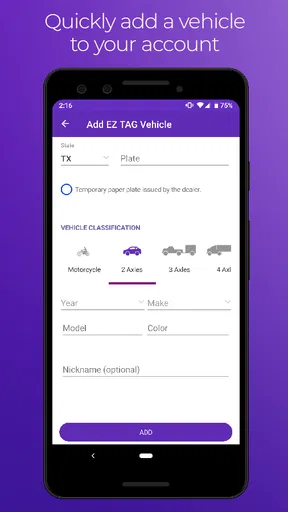
- Manage multiple vehicles and license plates in one place.
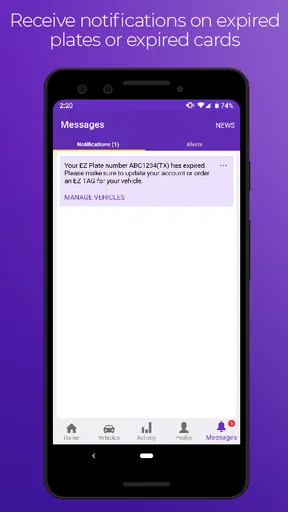
- Receive account notifications to help avoid missed payments.
- Easy access to customer support and account information.
Limitations of EZ TAG
- Some features may require a registered EZ TAG account.
- App usefulness is limited outside participating toll-road regions.
- Occasional login or loading issues may affect account access.
- Payment processing times can vary depending on the funding method.
- Users may still need the website for certain account changes.
Similar Picks in This Category
View All
Google Maps
Google LLC3.4

Google Maps Go
Google LLC4.1

Booking.com: Hotels & Travel
Booking.com Hotels & Vacation Rentals4.8

Google Earth
Google LLC3.8

Skyscanner Flights Hotels Cars
Skyscanner Ltd4.8

trivago: Compare hotel prices
trivago N.V.4.4
Frequently Asked Questions
What is EZ TAG, and what can I use it for?
EZ TAG is a toll-payment service app designed for drivers who use participating toll roads, particularly in Texas. After creating or accessing an account, you can typically manage your toll account, review charges, add or update vehicles, check payment activity, and handle account-related tasks from your phone. Availability and supported features may depend on your specific EZ TAG account and regional service area.
Do I need an EZ TAG transponder to use the app?
The app itself does not replace a physical toll tag in every situation. EZ TAG accounts are generally connected to a vehicle transponder, while some toll transactions may be identified through license-plate billing or other supported methods. Before relying on the app for travel, check whether your vehicle is properly registered, your tag is activated, and your account supports the payment method you intend to use.
How can I pay toll charges or add money to my EZ TAG account?
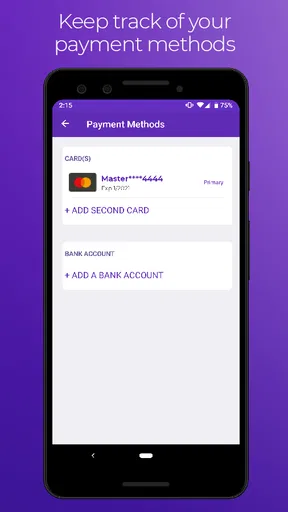
EZ TAG commonly allows users to manage payments through a linked payment card or another accepted funding method. Depending on the account type, you may be able to make a one-time payment, maintain a prepaid balance, or enable automatic replenishment when the balance becomes low. Review the payment screen carefully, because processing times, minimum amounts, and accepted payment methods can vary.
Can I manage multiple vehicles or EZ TAG transponders in the app?
For households or businesses with more than one vehicle, account management features may allow several vehicles and transponders to be associated with the same profile. You should verify each license plate, vehicle class, and tag assignment before driving on a toll road. Incorrect information can lead to misapplied transactions, additional fees, or notices being sent to the wrong vehicle.
Is EZ TAG safe to use, and what should I do if I notice an incorrect charge?
EZ TAG is intended to provide a convenient way to manage toll activity and payment information, but users should still protect their login credentials and keep the app updated through the official app store. If a charge appears unfamiliar or a toll is assigned incorrectly, review the transaction details first, then contact the official EZ TAG customer-service channel. Avoid sharing account passwords or payment information with anyone.
